
EU Recommerce in 2026: A Playbook for Refurbished, Repair & Compliant Listings
This year, recommerce will be more prominent in the EU. We see three changes pushing in the same direction: tougher rules on vague green claims, more focus on repair, and rising expectations for product-level data that explains what something is made of and how it can be fixed.
In this article, we cover:
- What to change on your product pages
- What to change in customer service
- What to prepare in your data so refurbished and repair become easier to run
Three EU Shifts That Will Push Recommerce
1) You will need to be more careful with “green” wording.
The EU is explicitly targeting misleading environmental marketing and wants consumers to get clearer, more reliable information.
2) Repair will become a bigger part of the default customer journey.
Right to Repair rules are being introduced across the EU through national implementation, which can affect how sellers and manufacturers handle repair, replacement, warranty, and spare parts.
3) Product data is becoming a go-to-market input, not just an internal file.
The Ecodesign for Sustainable Products Regulation sets the direction toward Digital Product Passports and better lifecycle information over time.
Clean Up PDP Sustainability Claims Before They Become a Liability
Most brands don't get into trouble because they intentionally lied, but rather because their PDPs contain vague claims such as "eco-friendly" or "sustainable" with no clear proof, and those claims exist on hundreds of SKUs.
Run this PDP claims checklist
- Inventory and classify claims: List every environmental claim on the PDP, including icons, badges, imagery, bullets, and A+ content, then tag each claim type (generic, “future promise,” recycled content, repairability, certification mention).
- Build SKU-level traceability: Find the evidence for each claim and link it to the SKU in a shared place, with a clear owner, version, and “last reviewed” date so teams can validate fast.
- Tighten the wording and visuals: Replace vague wording with specific, verifiable statements or remove it, and check that images and icons do not imply benefits you cannot support in text.
- Make it governable across teams: Assign an owner and review cadence, create a “do not use” list, and train editors with simple “do”s and “don’t”s.
- Plan how proof will show up on each channel: On marketplaces like Amazon, you often cannot add outbound links in descriptions that send shoppers to external proof. Instead, bring the proof into the content you control: state the specific fact and reference the evidence clearly (“made with X% recycled material based on study/standard name”) and keep the substantiation ready for review.
Common mistakes to avoid
- Using “green” as a badge instead of explaining what is improved and how it’s measured
- Making future promises without a clear, public plan behind them
- Treating supplier marketing slides as substantiation
- Updating one locale or one channel but leaving conflicting claims elsewhere
- Leaving old claims live after packaging, materials, or sourcing changes
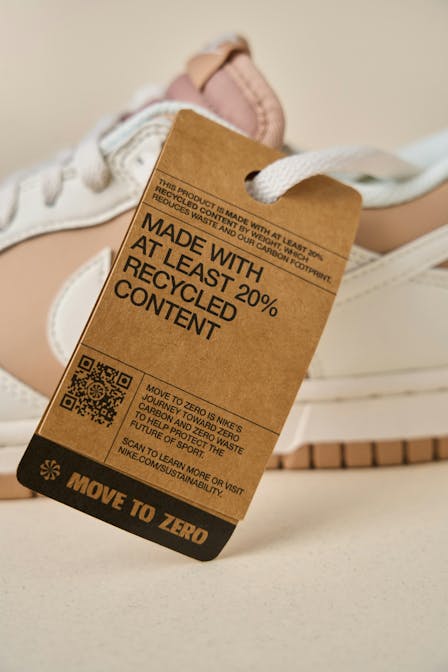
As a rule of thumb, if you cannot support a claim quickly, it should not be on a PDP at scale.
Build a Repair Flow That Customers Will Actually Use
Right to Repair is still being implemented at country level, so avoid promising specific legal outcomes in your customer messaging until national rules are final. For Germany, you can use the draft published by the Federal Ministry of Justice as a planning reference and to understand the direction of travel.
The no-regrets move you can make now is operational: make repair feel as simple as a return, because customers only choose repair when it is clear, predictable, and easy to track.
Create a repair-first service flow in five steps
1. Offer repair early and make it easy to find: Place “Repair” next to “Return” in your help center and order history, with a simple explanation of when repair is available and what the customer needs to provide.
2. Triage fast with a standard intake: Use a short form that captures issue type, photos or video, serial number, proof of purchase, and whether the product is safe to use while waiting.
3. Set expectations with transparent time and cost ranges: Share a realistic repair timeline, what happens next, and a clear price range where paid repair may apply. If you cannot estimate cost yet, explain what determines the price and when the customer will receive a binding quote.
4. Route the job reliably and document decisions: Define routing rules upfront: in-house repair, manufacturer repair, or certified partner. Log outcomes like “repaired,” “not repairable,” and “replaced” so you can measure drivers and improve product and service over time.
5. Close the loop with proactive updates and a clear completion note: Send status updates, confirm what was fixed, and include the next support option if the issue returns. Keep an internal record linked to the order or serial number so the next agent can see the full history.
If you sell on Amazon or have high return exposure, connect repair flows to return reduction work, so you do not solve problems twice. For more info on returns economics, read our Catapult blog post.
Get Your Product Data Ready for Digital Product Passport
You do not need to build a full passport tomorrow, but you do need to stop treating repair and lifecycle attributes as “random notes.”
Start by adding three fields into your PIM (Product Information Management) or product database for the categories where it makes sense:
- Recycled content percent per material component where relevant
- Spare parts availability and lead times
- Repairability signals: repair instructions availability, authorized partners, or part numbers where applicable
This also makes refurbished easier because grading and transparency become more consistent. Structured product data will be the foundation for both compliance readiness and recommerce scaling.

Launch Refurbished with Trust Signals That Convert
Refurbished products are on the rise because they hit three customer needs: lower price, lower waste, and “good enough” quality when the process is clear.
One example from Galaxus highlights strong growth in refurbished categories and large savings claims for some products.
Top 6 moves to make refurbished feel safe
1. Use simple condition grades with plain language like “Like new” and “Good”
2. Put warranty and returns info directly on the refurbished offer
3. Explain what “refurbished” includes: tests, cleaning, parts replacement, data wipe for electronics
4. Show the price comparison clearly against the new item
5. Keep choices manageable so customers are not overwhelmed by too many grades
6. Decide where it lives: same PDP with a condition selector, or a separate PDP with strong cross-links
Refurbished converts when you productize trust through grading, transparency, and warranty clarity.
Choose the Next Step for Your Brand
If you want to start working on your recommerce strategy this quarter, do a two-week sprint:
- Clean up PDP claims on your top SKUs
- Define a repair-first flow
- Pick one category to launch refurbished with clear grading and warranty language
Want a practical plan tailored to your catalog and channels? Book a meeting with us to talk about PDP claims, repair flow, and refurbished offer design.